Turning the ai-sdlc CLI into an Electron GUI
We re-implemented the ai-sdlc Python CLI as a native SDLC module in our Electron and Vue 3 desktop app. The AI wrote the TypeScript and Vue code in under six hours, and the module still needs end-to-end testing before deeper integrations.
From CLI to GUI
We added an SDLC module to our desktop app, which gives the structured ai-sdlc process a graphical interface. It re-implements the core logic of the open-source ai-sdlc Python CLI tool as a native TypeScript module in our Electron and Vue 3 app. The speed reflects the highly efficient approach at the core of my AI-first Development Philosophy.
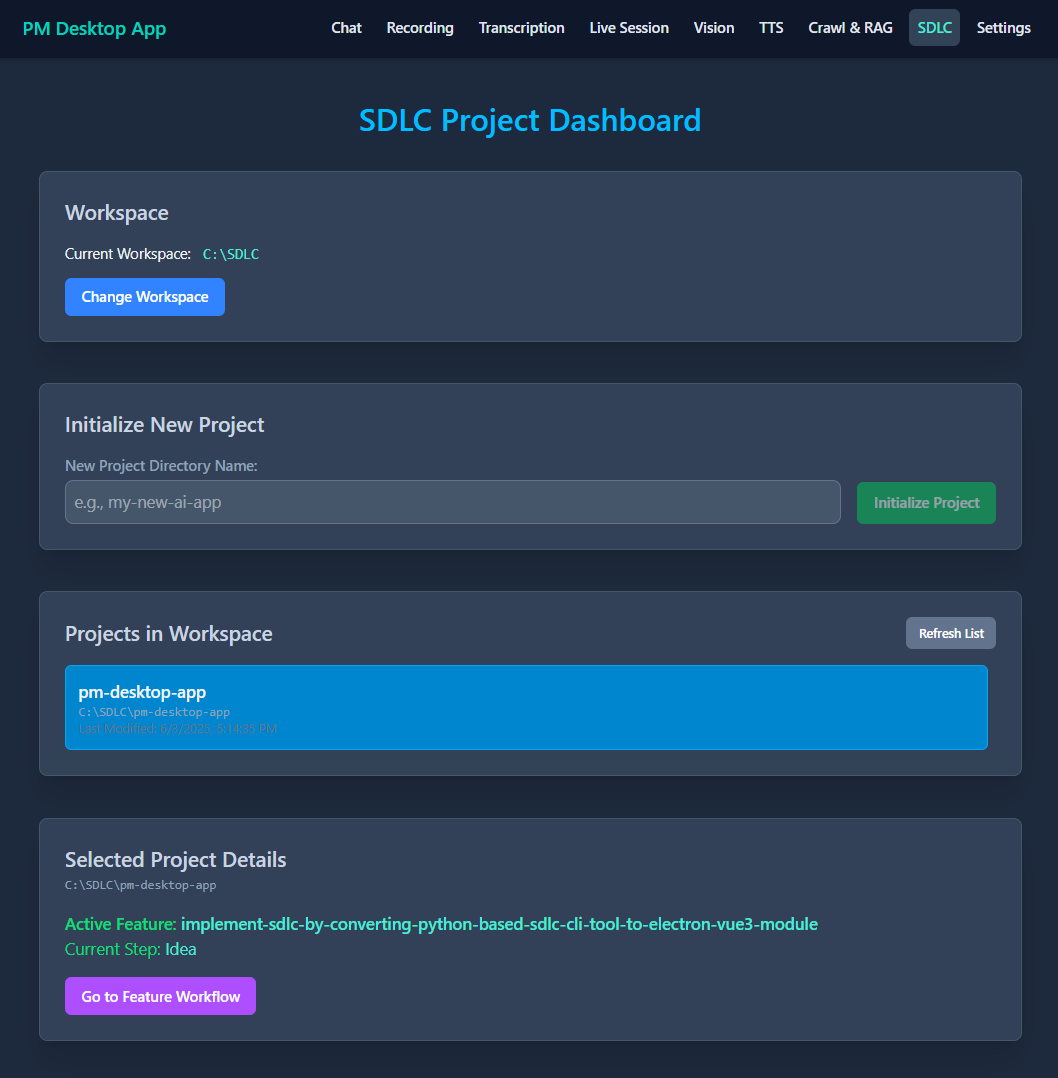
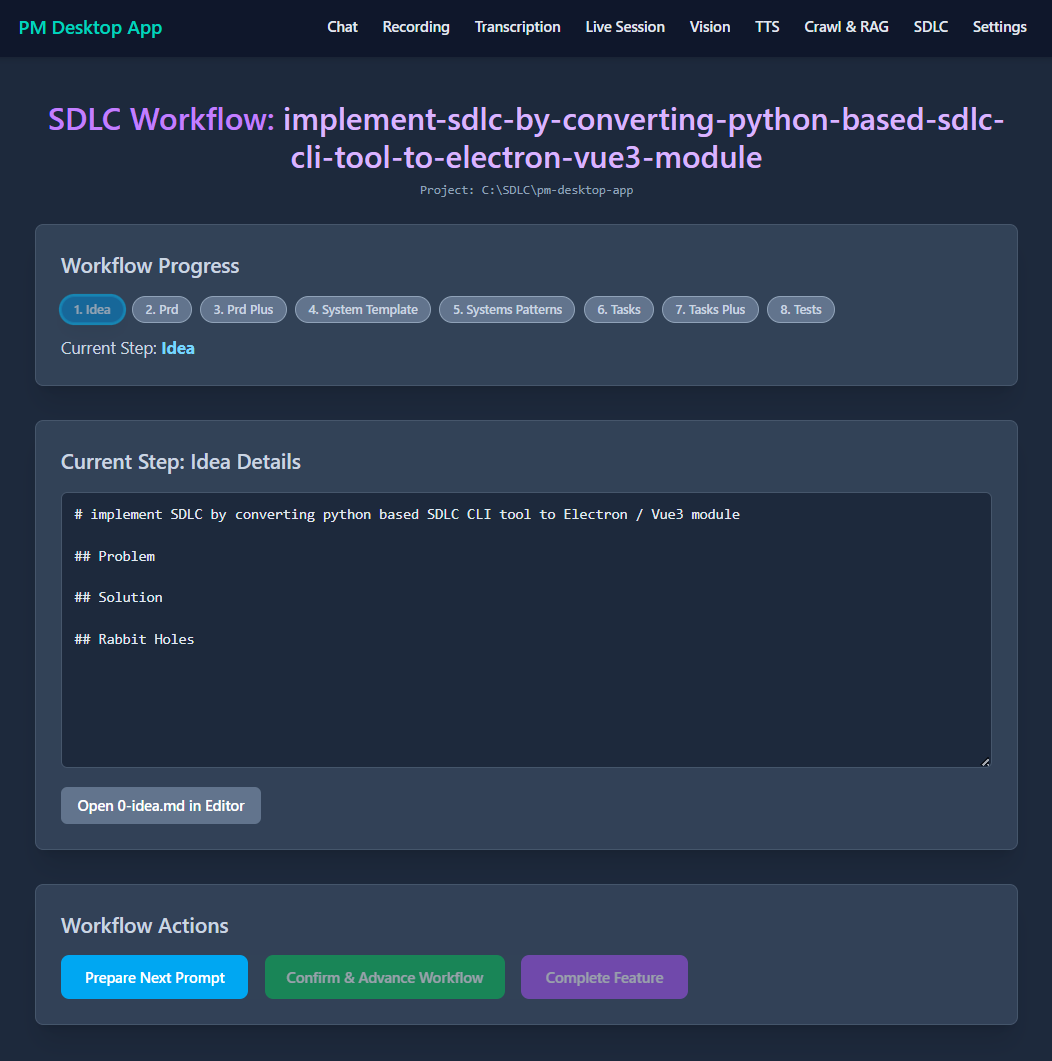
A graphical interface for a proven SDLC workflow
The ai-sdlc CLI provides a structured 8-step method for guiding software development, especially with AI assistance. A command-line interface can be less intuitive for some users. SDLC makes this process more accessible and visual by:
- Re-implementing the ai-sdlc file and state management (project initialization, feature tracking, step progression, prompt template handling) in TypeScript, in the Electron main process.
- Building a Vue 3 frontend where users start projects, manage features, move through SDLC steps, view generated AI prompts and track progress.
- Integrating the module into the desktop app, alongside the other AI features described in The tech stack behind our desktop AI assistant.
How the rebuild went
Our strategy relied on clear context and a plan, following the principles in 15 tips for AI-first development in AI Studio.
Understanding the blueprint with code2prompt
To make the re-implementation accurate, we gave our development environment and Gemini the complete context of the original Python ai-sdlc tool. We used code2prompt to combine the whole Python project into one Markdown file. For large codebases, I built a Tkinter GUI helper for code2prompt. The combined output served as the technical specification.
Systematic re-implementation from Python to TypeScript
A detailed system instruction defined the target architecture: Electron, Vue 3, TypeScript, Node.js file system operations, and TOML and JSON parsing. It also set modular patterns, described in The 30+ tools in my AI development stack. Gemini translated the Python logic into utility functions, main process services that mirror each ai-sdlc command, and the IPC and preload layer.
Building the Vue 3 GUI
With the backend logic in place, Gemini built the interface: a dashboard for project management and a detailed workflow view for the 8 SDLC steps, with prompt display and action buttons. This fits the idea in Using conversational AI as the new IDE.
Collaborative debugging and refinement
Minor integration issues and Vue-specific warnings came up during the build. We fixed them quickly through an iterative feedback loop with Gemini.
The result
In less than six hours, we turned the core of the ai-sdlc workflow into a fully integrated SDLC module. Users can now manage the full lifecycle in the desktop app, from initializing projects to completing features. The pace comes from guiding the AI well, as in AI's Near-Flawless Execution.
Future integrations and the agnostic approach
The SDLC module is LLM-agnostic at its core, like the original ai-sdlc tool. It generates prompts that users can take to any AI coding editor, VS Code fork, AI-assisted IDE or standalone AI chat. Users can choose from many models, as they can with OpenRouter for its LLM variety, and that flexibility is key.
The bigger gain will come from the other features in our desktop app. Imagine a one-click SDLC planning flow. A local Ollama model, running on NVIDIA GPUs + Ollama for local AI, would expand a feature request, and its output would feed SDLC's first step.
When SDLC generates a prompt for the PRD, a button could "Send to Local AI Chat" and pre-populate the prompt in our app's Ollama chat interface. The AI's response could then be saved directly to the correct SDLC Markdown file.
Similar integrations are planned for the Vision feature, which would analyze UI mockups for PRD generation. The RAG system could query existing project documents, as covered in Do million-token context windows replace RAG? and integrating Crawl4AI for RAG. Live Session summaries could become input for new ideas.
Key takeaways
- Providing a complete, existing codebase as a specification, with tools like code2prompt, is highly effective for AI-driven re-implementation.
- A clear system instruction that defines the target architecture and standards matters for AI coding assistants. Learning to prompt well is one of the Six resources for vibe coding with AI.
- Modular design makes rapid, AI-assisted development of complex features possible. Clear user stories matter here.
- The developer's role becomes high-level architecture, precise requirement definition and careful validation, which enables fast development. The result is a system that holds up, which is a different job from the AI hammer for throwaway apps.
Next, the SDLC module needs end-to-end testing and UI refinements. After that comes deep integration with the app's other AI tools. AI can also enhance workflows in Google Sheets & Apps Script and through platforms like n8n.