15 tips for AI-first development in AI Studio
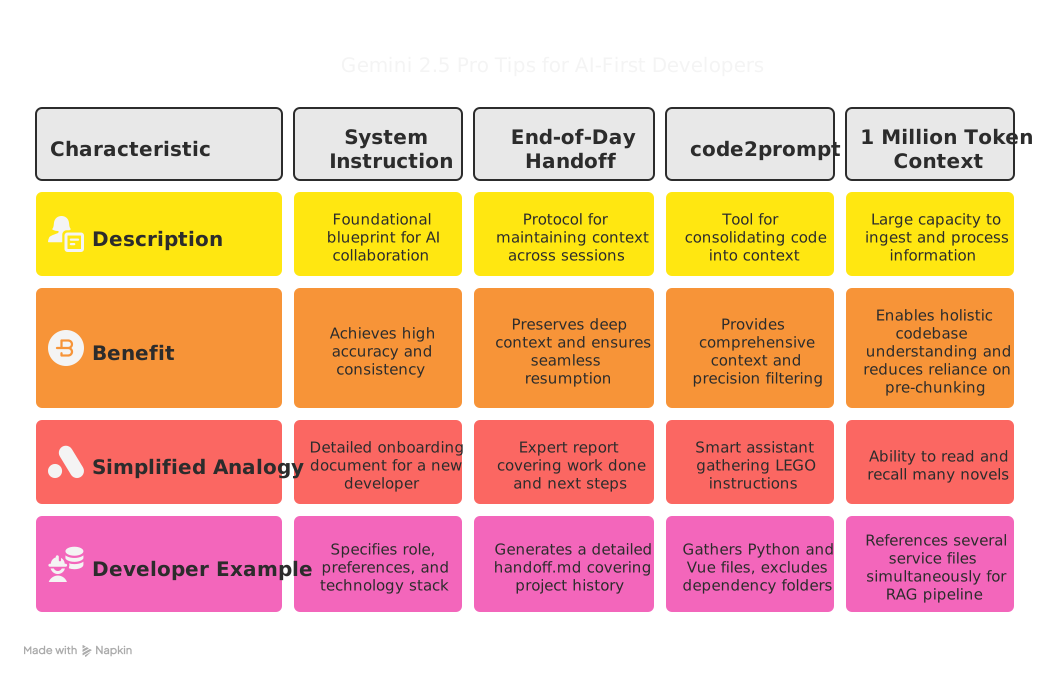
A detailed system instruction is the most impactful technique when you build with Gemini 2.5 Pro in Google AI Studio.
Google Gemini 2.5 Pro Preview 05-06 in Google AI Studio does precise work when it is properly guided. How you structure the collaboration decides the result. These 15 tips come from my recent work with it.
1. Write a detailed system instruction
A system instruction is a detailed directive you give Gemini at the start of a project or a series of related sessions. It defines the AI's persona (for example, "Electron/Vue Desktop Application Development Assistant"), its goal, its constraints, output formatting, coding standards, the technology stack, security practices and its problem-solving method. Every output from the AI partner follows it.
In an AI-first workflow, the LLM writes most of the code, so this is the most impactful technique for accuracy and consistency. It turns Gemini from a general-purpose model into a project-aware developer. Its code, explanations and architecture suggestions match the project from the first attempt. It also reduces repeated prompting for boilerplate and style, and it often gets complex tasks right on the first or second try.
The PM Desktop App (an Electron, Vue, FastAPI and Docker application) runs on a detailed system instruction. It sets Gemini's role as an Electron/Vue desktop application development assistant. It also sets these rules:
- Every modification or new file comes back as the complete file content.
- Files use specific start-of-file and end-of-file markers.
- Existing comments are kept, and new code uses a clear, hierarchical comment style.
- The stack is Electron, Vue 3 with the Composition API, TypeScript, Vite, Tailwind CSS, Ollama and Whisper, with a modular main, preload and renderer architecture.
- Security follows secure Electron practice, including context isolation, IPC security and API key management.
- Errors are analyzed and fixes are proposed within the Electron and Vue context.
Because of this briefing, the generated code for components, services, IPC handlers and Docker configurations has been consistently accurate and needed few changes. I decide what to build, and Gemini handles how it fits the project's requirements.
2. Keep continuity with an end-of-day handoff
This is a disciplined protocol that goes beyond copy-paste between chats. At the end of a session, I prompt Gemini with a dedicated handoff prompt to write a handoff.md file. The file covers the session's progress, development history, architecture decisions and their reasons, challenges solved, the current state of the codebase and the agreed next steps. The next session starts from that file.
In an AI-first workflow, Gemini is the main developer, so context has to hold across many long chats held at different times. The handoff file does that in four ways.
- It preserves deep context. It records why the architecture is the way it is, the feature history and how past problems were solved. That is richer than pasting code snippets.
- It makes resumption fast. Gemini can catch up to the exact state where you left off, whether you return hours or days later.
- It reduces re-explanation and drift. Long chats can lose earlier constraints, and a handoff repeats them.
- It forces a structured review. Writing the handoff makes you consolidate the current state and the next steps.
At the end of each major session on the PM Desktop App, I use a handoff prompt that asks Gemini to act as a technical writer and software architect. The handoff.md covers the project overview, development history (such as the Ollama integration, the RAG backend and Dockerization), architecture decisions, key debugging challenges, the current state and future suggestions.
The next session begins with the latest handoff.md. That is why Gemini can write new features that integrate with months of earlier AI-generated work.
3. Use code2prompt to supply context
Pasting snippets works for small tasks. For a large project, code2prompt scans the directory, applies include and exclude filters, and combines the relevant code into one context block for Gemini.
In an AI-first workflow, it helps in five ways.
- It gives Gemini context from many files and folders at once. That supports codebase analysis, cross-module refactoring and documentation for a whole project.
- Include and exclude rules keep irrelevant code out. Answers become more focused, and token usage drops.
- It replaces hand-copying code from complex directory trees.
- It can keep the directory structure and use custom templates, so Gemini sees how the codebase is organized.
- It works well on code Gemini wrote earlier. The model already knows the structure and style it created.
To use it:
-
Install code2prompt with its recommended method, often
pip or cargo, and see the official
Getting Started guide. A common pip install is:
pip install code2prompt_rs
- Open a terminal in your project directory.
-
Run code2prompt with filters:
code2prompt . --include "**/*.py" --include "**/*.vue" --exclude "**/node_modules/**" --exclude "**/.venv/**" --output-file context_for_gemini.md
This gathers all Python and Vue files, excludes common dependency folders and saves the context to context_for_gemini.md. - Give Gemini the content of context_for_gemini.md, or use AI Studio's file upload for very large context if the feature is available. Then add your prompt.
For a more visual way to make these selections on large projects, I built a Tkinter GUI helper for code2prompt. Gemini also helped me develop it.
For example, after Gemini generated the initial structure of ai-desktop-assistant/kokoro_fastapi_server/rag_core/, I wanted error handling in all of its Python service modules. I ran:
code2prompt ./kokoro_fastapi_server/rag_core --include "*.py" --exclude "__init__.py" --output-file rag_core_context.md
I gave rag_core_context.md to Gemini with this prompt: "Analyze the provided Python modules from the rag_core package. Identify all functions that interact with external services or perform file I/O. For each, ensure try-except blocks catch specific exceptions (e.g., httpx.RequestError, ChromaDBError, FileNotFoundError), and that custom exceptions from rag_core.exceptions are raised or handled appropriately. Provide the complete, updated content for each modified file, adhering to our System Instruction."
4. Use the 1 million token context window strategically
Gemini 2.5 Pro Preview has a 1 million token context window. Its publicly documented sibling, Gemini 1.5 Pro, scales to 2 million tokens. In one session, that window holds thousands of pages of text, a codebase of about 50,000 lines, or a very long conversation.
It helps in four ways.
- Gemini can hold an entire application in view. For the full RAG pipeline in ai-desktop-assistant, it referenced several service files at once, which made the generated and refactored code more consistent.
- Less pre-chunking is needed. Google's Gemini 1.5's long context capabilities documentation says the manual pre-processing needed to fit large documents or codebases can be reduced. Often you can provide the entire relevant corpus.
- Many examples fit in the prompt. You can give numerous examples, specifications or a style guide, and Gemini can handle niche tasks with good fidelity. Sometimes that rivals fine-tuned models, without the training cost.
- Multi-document analysis fits in one session. Synthesizing several large technical documents, comparing architectures in separate papers and reading a full user manual all become practical.
To use it:
- When refactoring or adding features across files, use code2prompt to combine the relevant code, which may span many files, into one input.
- When asking for an application skeleton or a complex feature, include the complete design documents, user stories and technical specifications in the prompt.
- For a new large module, combine the requirements, the relevant interfaces from earlier handoffs and the coding standards in one prompt within the 1 million token limit.
- Feed large log files or text datasets to Gemini when pattern detection, anomaly detection or summaries need the bigger picture.
When we built the multi-stage RAG backend for ai-desktop-assistant, the Electron app called the main FastAPI server, which called the Dockerized crawler service. The 1 million token window helped there. I gave Gemini the OpenAPI specifications or Pydantic models for the inter-service calls, the FastAPI router and orchestrator code, and the Electron main process TypeScript client code, all in one go.
Then I prompted: "Given this entire interaction flow and the existing code for services A, B, and C, generate the new TypeScript function in Electron's crawlRagService.ts to correctly call the FastAPI /rag/ingest endpoint, handle its JSON response, and manage potential errors, ensuring it aligns with the System Instruction for IPC handling."
That view let Gemini produce accurate, integrated code.
Even with a 1 million token window, prioritize the most relevant context. For long-term memory across many unrelated tasks, fine-tuning or dedicated knowledge bases still matter, and RAG helps build those knowledge bases. Google also calls context caching a key optimization for API users who run frequent long-context queries.
5. Plan the architecture and let AI write the details
Your job as the AI-first developer is to define the architecture, the overall plan and the contracts between modules. Then you prompt Gemini to implement each planned component.
This combines your strategic thinking with the model's coding strength. You decide what to build and why. Gemini, guided by the System Instruction and the task prompts, works out how to build each piece.
My plan for the RAG backend had a Dockerized crawler, a main FastAPI orchestrator and several rag_core services. I prompted Gemini for each piece in turn:
- "Design the Dockerfile for the crawler service."
- "Implement the FastAPI endpoint for /rag/ingest which calls the ingestion orchestrator."
- "Write the chroma_service.py module as per these functions: [list the functions]."
6. Split work into modular tasks
Structure your requests as a series of defined, modular tasks, the same way you would structure a software project. Each module of the application can map to a focused set of interactions with Gemini.
With a clear scope and the System Instruction, Gemini can generate a whole Python module or Vue component with high fidelity. The result is a clean, maintainable AI-generated codebase. For example, one prompt asked for a whole router:
"Create the complete Python file routers/rag_router.py. It should include an APIRouter, Pydantic models for [X, Y, Z], an ingestion_worker_rag function (based on previous discussions about multiprocessing and Playwright), and the /rag/ingest and /rag/query endpoints as specified here [details]. Ensure all necessary imports are included and adhere to our project's System Instruction."
7. Ask for step-by-step reasoning on hard problems
For complex logic or debugging, ask Gemini to think step by step, explain its reasoning before giving the solution, or outline its approach first.
This makes the model's problem solving visible. It often leads to more correct solutions, and you can redirect the model if its plan drifts before the final algorithm or bug fix is written.
For example, a Playwright integration failed with a NotImplementedError on Windows. I prompted: "The Playwright integration is failing with a NotImplementedError on Windows. Analyze the provided traceback [paste traceback]. Explain the likely cause step by step, considering asyncio event loop policies on Windows. Then propose a series of solutions, starting with the simplest, and explain the rationale for each."
8. Use screenshots, diagrams and PDFs as input
Gemini 2.5 Pro Preview, like the Gemini 1.5 family, is natively multimodal. It processes images directly and can reason over entire PDF documents within its 1 million token window. You can upload screenshots, diagrams, photographs, schematics or multi-page PDF specifications into Google AI Studio and prompt Gemini with both the visuals and the text.
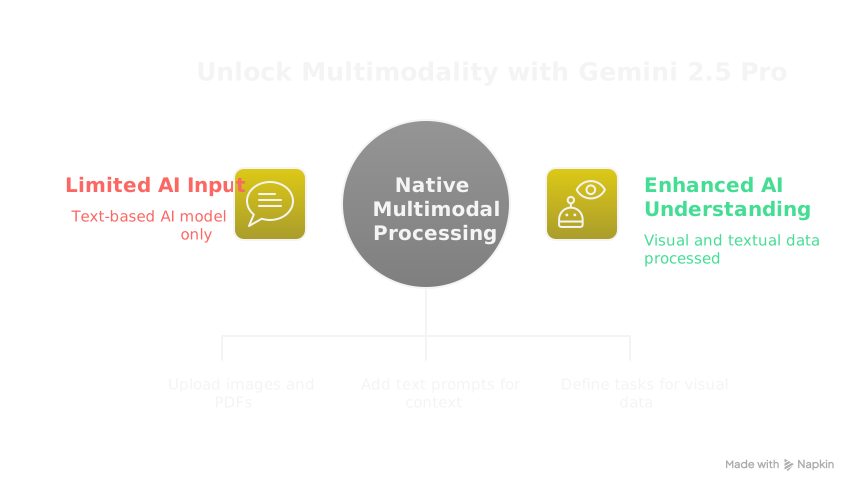
Visual input helps in five ways.
- Beyond captioning. Gemini can answer detailed questions about visual content, transcribe text from images and PDFs, and locate objects with bounding box coordinates or segmentation masks.
- Visual design to code. Give it a UI mockup or screenshot and ask for HTML, CSS and JavaScript, or Vue or React components.
- Complex visuals. It can explain an architecture diagram, flowchart or database schema, point out issues, or write code for part of the system it shows.
- Chat with PDFs. Upload a large technical manual, API documentation or research paper, then ask specific questions, summarize sections or extract key information.
- Debugging visual output. If your application generates images or visual reports, upload a bad output and describe what you expected.
Google's documentation on Image Understanding with Gemini describes this native multimodality. It makes use cases possible that used to require chaining several specialized AI models.
To use it in AI Studio:
- Use AI Studio's upload features to add images or PDF files to your chat. The Google docs show SDK examples with the File API or inline Base64, but AI Studio usually wraps this in an upload button.
- Refer to the uploaded files in your text prompt. You can attach several images. For example: "Based on the uploaded UI mockup (image1.png) and these branding guidelines (brand_colors.pdf), generate the Vue component code."
-
Be specific about the visual task.
- UI generation: "Generate HTML and Tailwind CSS for the user profile card shown in the screenshot."
- Diagrams: "Explain the sequence of operations depicted in this flowchart."
- PDFs: "Summarize section 3 of the uploaded technical manual regarding API rate limits."
- Object detection, if your AI Studio prompt supports it: "Identify all the tools on the workbench in this image and describe their likely function." Gemini can output bounding boxes in JSON, but whether AI Studio displays them depends on its interface.
- Use clear, sharp, correctly rotated images. With a single image, put your text prompt after it.
For the Vision page in our Electron app, I designed a UI mockup first. I uploaded a screenshot of it and prompted: "Generate the Vue 3 component structure and initial Tailwind CSS for this Vision page layout. The layout should include areas for image upload or URL input, image preview, model selection with status, a prompt textarea and a response display area. Ensure it adheres to the responsive design principles outlined in our System Instruction."
Gemini returned the foundational Vue components, which sped up the UI work for that feature. In another prompt I uploaded a diagram of the ai-desktop-assistant architecture and asked for "a concise textual description of the main components and their interactions, suitable for inclusion in our project's README.md."
The exact upload methods, and the full range of multimodal features such as bounding box output or segmentation masks, vary with the AI Studio interface for your Gemini 2.5 Pro Preview version. Check the AI Studio UI and the preview documentation.
9. Require logging in generated code
In your prompts or the System Instruction, ask Gemini to add // console.log in JavaScript, print() in Python, or suitable logging statements at the key points in the code it generates.
Code that is instrumented from the start reduces the time you spend adding first diagnostic logs. You can check the execution path and variable state sooner.
For example: "Generate the Python ingestion_worker_rag function. It will run in a separate process. Include print statements prefixed with [IngestionWorker_RAG Process {os.getpid()}] to trace its startup, key async operations, event loop policy setting and final result packaging for the queue."
10. Iterate with branch chats
Use AI Studio's branch chat feature to explore variations or follow-up requests from one point in a conversation, without changing the main thread.
When Gemini gives you a near-perfect component and you want a small change, such as a new feature or a different error handling strategy, a branch lets you try it without rebuilding the context in a new chat. It suits refinement from a strong output.
Gemini generated the CrawlIngestionResponseModel. I branched the chat twice. Branch 1: "Add an optional traceback_debug: Optional[str] field." Branch 2: "Make the errors field a list of structured error objects instead of just strings."
11. Delete old messages to prune context
Remove earlier messages, both yours and Gemini's, from the current AI Studio chat.
Even with a large context window, older instructions or discussions that no longer apply can pollute the model's focus. Deleting them keeps the context relevant. Gemini then works on the current task, using the System Instruction and the latest handoffs.
We first discussed run_in_threadpool for the crawler, then switched to multiprocessing. I deleted the earlier run_in_threadpool messages, so Gemini's advice on the ingestion worker covered only the multiprocessing approach.
12. Generate READMEs with AI
Ask Gemini to write documentation, such as READMEs, API docs or code comments, from the code or a high-level project description.
Gemini wrote the code under your System Instruction, so it knows that code well. Asking it for documentation often produces accurate first drafts, which cuts the manual work.
After Gemini generated the whole ai-desktop-assistant structure and RAG backend, I prompted: "Generate a comprehensive README.md for the ai-desktop-assistant project. Describe its features, tech stack, prerequisites and setup instructions for the Electron app, the main FastAPI server and the Dockerized crawler service. Incorporate details from our previous handoff document discussions."
13. Use AI to debug
Give Gemini the code, error messages, tracebacks and context, then ask it to diagnose the bug and suggest fixes. This works for complex logic problems, not only syntax errors.
Gemini 2.5 Pro can often analyze complex tracebacks, such as the Playwright NotImplementedError, and suggest next steps or the root cause. It uses the System Instruction and earlier prompts to find where the code it generated went wrong.
For example: "The ingestion_worker_rag process is still failing with a NotImplementedError despite using multiprocessing and setting WindowsSelectorEventLoopPolicy. Here's the latest traceback from the worker [paste traceback]. Given our goal to run Playwright in this isolated process, what other factors or deeper system interactions could be causing this, and what is the most useful next diagnostic or solution step?"
This mirrors our debugging process for the Playwright issue.
14. Use web search for recent problems
Turn on Gemini's web search, or ask it to search, to find information newer than its training data cutoff.
For a very recent library release, an OS patch that breaks something or an undocumented API behavior, web search reaches recent community discussions, bug reports and articles. That can surface current leads.
Developer example: "Search for recent issues or discussions related to Python 3.12 (MS Store version) and Playwright causing NotImplementedError with asyncio.create_subprocess_exec on Windows, even when WindowsSelectorEventLoopPolicy is set."
15. Use core branching to compare solutions
Core branching is an advanced use of branch chats. Start with one core problem or objective. Then create parallel branches, each asking Gemini to explore a fundamentally different architecture or high-level solution.
You can compare the plans, pros, cons and first code from each branch. That helps you choose an architecture without coding every path yourself.
The core objective was: "Implement real-time updates from server to Electron client." I branched it into three prompts:
- "Design a solution using WebSockets."
- "Design a solution using Server-Sent Events."
- "Outline a long-polling mechanism."
For each branch, detail the setup, pros, cons and boilerplate server and client code.