June 2, 2025 · essay
n8n Community Spotlight: Unpacking the Popular 'AI Powered RAG Chatbot for Your Docs' n8n Workflow
Discover why the 'AI Powered RAG Chatbot for Your Docs' n8n workflow is a community favorite! Learn how it uses Google Drive, Gemini, and Qdrant to unlock your document knowledge.
The short version
- LLM
- This workflow prominently features Google Gemini for its conversational AI capabilities and metadata extraction. It also implicitly uses embedding models for vectorization in Qdrant.
- Why
- To highlight a popular n8n community workflow that empowers users to transform their Google Drive documents into an interactive, AI-powered knowledge base using RAG, Gemini, and Qdrant, thereby making document silos easily searchable and conversational.
- Challenge
- Making large repositories of documents in Google Drive easily accessible and queryable via natural language. This involves orchestrating document retrieval, chunking, embedding, vector storage (Qdrant), and integrating a powerful LLM (Gemini) for contextual responses and chat history management.
- Outcome
- A widely adopted n8n workflow template that provides a robust solution for building an AI-powered RAG chatbot. It successfully integrates Google Drive, Gemini, Qdrant, and Telegram for notifications, enabling users to chat with their documents effectively.
- AI approach
- The workflow embodies an AI-First approach by using Google Gemini as the core intelligence for understanding user queries, generating context-aware responses based on RAG, and even extracting metadata from documents. The entire system is orchestrated by n8n to leverage AI for transforming static documents into dynamic conversational assets.
- Learnings
- The high community interest underscores the significant need for accessible RAG solutions. Combining n8n's orchestration capabilities with services like Google Drive, Gemini for AI, and Qdrant for vector storage creates a powerful and practical tool. Secure management of vector stores, including verified deletions, is also a key consideration.
The AI Powered RAG Chatbot for Your Docs
It's always incredibly gratifying to see the n8n community actively engage with and find value in shared workflow templates. As I mentioned in my recent roundup of popular n8n workflows, some solutions truly resonate, tackling common yet complex challenges with elegant automation. Today, I want to zoom in on one such standout: the AI Powered RAG Chatbot for Your Docs + Google Drive + Gemini + Qdrant.
This workflow has consistently been one of the most visited templates, and for good reason. It addresses a critical need for many individuals and organizations: how to transform a static repository of documents into an interactive, intelligent knowledge base.
The Challenge: Unlocking Your Document Silos
We all have them – folders brimming with PDFs, Word documents, text files, and spreadsheets in Google Drive or other storage. These documents contain valuable information, but accessing and making sense of it at scale can be a monumental task. Manually searching through hundreds of files for specific answers is inefficient and often frustrating. How do you make this collective knowledge easily queryable and conversational? This is precisely where Retrieval Augmented Generation (RAG) comes into play, a topic I've explored in detail in my post "To RAG or Not to RAG?".
How It Works: A Symphony of AI and Automation
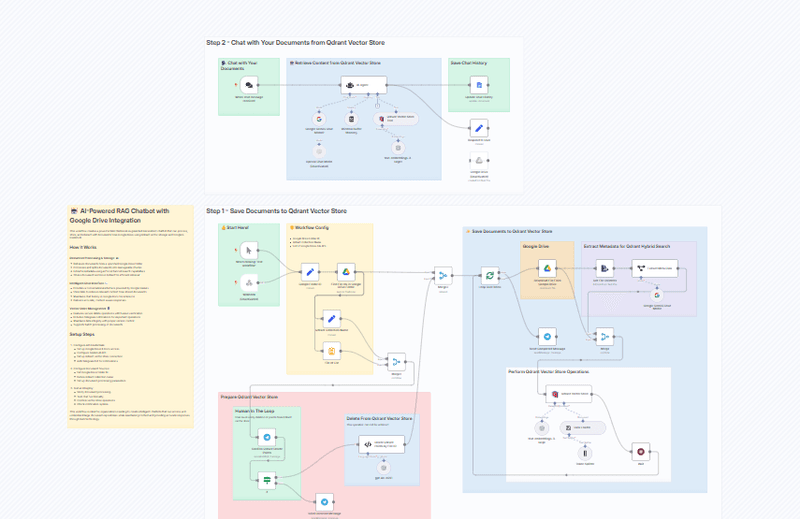
This n8n workflow orchestrates a sophisticated RAG pipeline, turning your Google Drive into an intelligent, conversational partner. Let's break down its core mechanics:
-
Document Processing & Storage 📚:
- The workflow diligently retrieves documents from a Google Drive folder you specify.
- It then processes and splits these documents into manageable chunks, optimized for AI understanding.
- Leveraging AI, it extracts key metadata from your documents. This isn't just about file names; it's about understanding the content to enable enhanced, context-aware search capabilities.
- Finally, these processed chunks and their metadata are transformed into vectors and stored in a Qdrant vector database. Qdrant is a fantastic choice for this, offering efficient similarity search, which is the heart of RAG.
-
Intelligent Chat Interface 💬:
- Once your knowledge base is built, the workflow provides a conversational interface powered by Google's Gemini AI. Gemini's powerful language understanding allows users to ask questions in natural language.
- The magic happens when the RAG system kicks in: based on your query, it retrieves the most relevant document chunks from Qdrant.
- This retrieved context is then fed to Gemini along with your original question, enabling it to generate accurate, context-aware responses grounded in your specific documents.
- For easy reference, the workflow also thoughtfully maintains a chat history in Google Docs.
-
Vector Store Management 🗄️:
- Managing a knowledge base is crucial. The workflow includes features for securely deleting documents from the Qdrant vector store, complete with human verification steps via Telegram notifications to prevent accidental data loss.
- It supports batch processing, making it easier to onboard large volumes of documents.
The Power Stack: n8n, Google Drive, Gemini & Qdrant
The effectiveness of this workflow lies in its intelligent combination of best-in-class tools, a cornerstone of any successful AI development power stack:
- n8n: Acts as the central orchestrator, seamlessly connecting all the different services and managing the logic flow. This is a prime example of how n8n can be used for orchestrating complex AI systems.
- Google Drive: A familiar and accessible place for storing source documents.
- Google Gemini: Provides the advanced natural language understanding and generation capabilities for the chatbot interaction and metadata extraction.
- Qdrant: A high-performance, open-source vector database ideal for storing and searching the embeddings generated from your documents.
Setting Up Your AI-Powered Document Assistant
While the workflow is sophisticated, the template simplifies the setup. Key steps involve:
- Configuring API Credentials: You'll need to set up access for Google Drive & Docs, the Gemini AI API, your Qdrant vector store, and a Telegram bot for notifications. The template also includes a node for deleting Qdrant points which requires an OpenAI API key (for its embedding model used in the LangChainJS-based deletion logic).
- Defining Document Sources: Specify your Google Drive folder ID and the Qdrant collection name.
- Testing and Deployment: The workflow guides you through verifying each part of the process.
Why is This Workflow a Community Favorite?
The popularity of this RAG chatbot template likely stems from several factors:
- Solves a High-Value Problem: Making internal documentation and knowledge bases easily accessible and interactive is a game-changer for productivity and decision-making.
- Leverages Cutting-Edge AI: Integrating powerful models like Gemini makes the chatbot truly intelligent.
- Practical RAG Implementation: It provides a clear, working example of a RAG pipeline, which is a hot topic in the AI space.
- Showcases n8n's Power: It demonstrates how n8n can be used to build sophisticated, multi-step AI applications, aligning with an AI-First approach to building solutions.
Take Control of Your Document Knowledge
If you're looking to build an intelligent chatbot that can tap into the wealth of information stored in your Google Drive, this n8n workflow template is an excellent starting point. It’s a testament to how powerful automation tools, combined with advanced AI and vector databases, can democratize access to sophisticated AI solutions.
You can find the workflow template here: AI Powered RAG Chatbot for Your Docs + Google Drive + Gemini + Qdrant.
And if you're looking to implement custom AI automation solutions like this, or need strategic guidance on your AI journey, feel free to explore the services offered at workflows.diy.