How Supabase runs the PlantDex backend
Supabase gave PlantDex a database, user accounts, file storage and serverless functions without a custom backend. A backend-as-a-service supplies these parts pre-built, so a small team does not build and run its own server for them.
What is backend as a service (BaaS)?
For a solo developer or a small team, building a backend by hand is slow and expensive. It means server-side logic, databases, user authentication, file storage and the infrastructure behind the frontend.
Backend as a service (BaaS) platforms provide pre-built backend components that you integrate into your app. Instead of building everything from scratch, you use these ready-made services through APIs and SDKs. Developers can focus on the frontend and core application logic, which speeds up development.
Common services offered by BaaS providers include:
- User authentication for sign-ups, logins, password resets and social logins.
- Managed cloud databases, SQL or NoSQL, for data persistence.
- Cloud storage for user-uploaded files such as images, videos and documents.
- Serverless functions that run custom backend code without managing servers.
- Real-time features for live chat and instant data sync.
- Many providers also offer analytics, push notifications and hosting.
BaaS usually brings faster development, less operational overhead, built-in scalability and often lower initial costs.
Why Supabase became PlantDex's backend
PlantDex is our plant identification and cataloging app. We needed a backend that developers could use easily and that could scale. After evaluating options, we chose Supabase, and it carried much of the backend work. Supabase calls itself an open source Firebase alternative, and its foundation on standard technologies is what sets it apart for us.
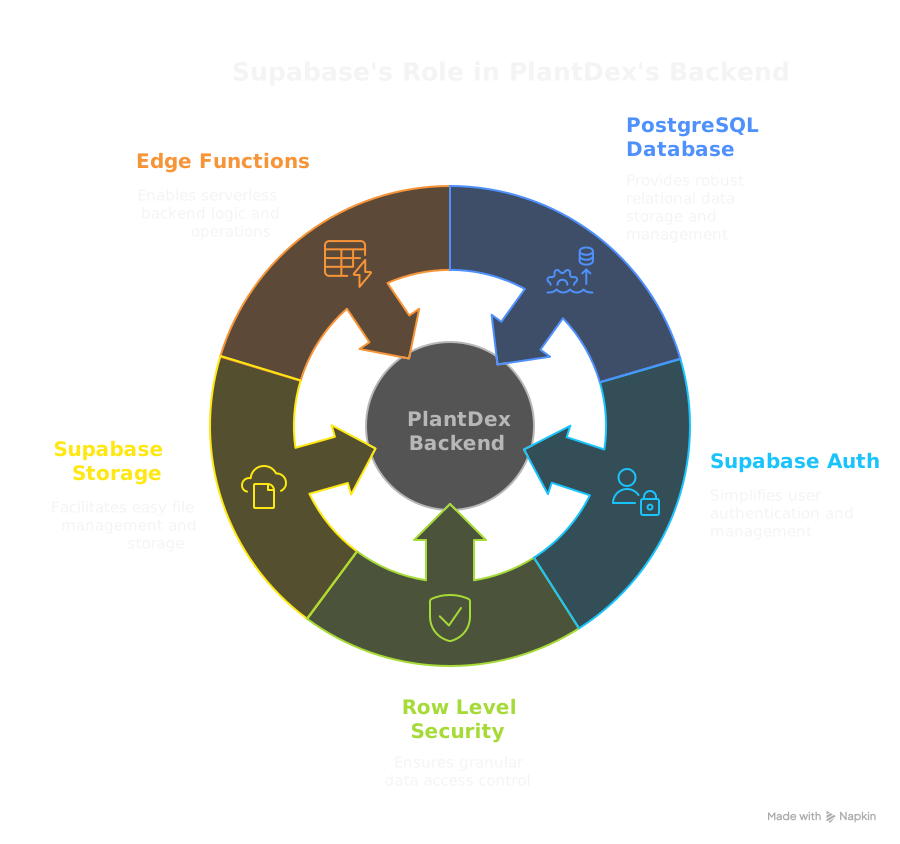
This is how Supabase powered PlantDex. Our AI development assistant implemented all of the integrations under architectural guidance.
1. PostgreSQL database
Every Supabase project comes with a dedicated PostgreSQL database. We defined the plants table with a clear schema and relationships, such as linking plants to users. Our AI assistant generated the DDL (Data Definition Language) for the table and used Supabase's client library to work with it.
2. Supabase Auth for user management
Supabase Auth handles user accounts, sign-ups with email verification, logins and password resets. Our AI assistant connected it to the Vue 3 frontend and the Pinia authStore. It set up listeners for authentication state changes and protected the routes.
3. Row Level Security for data protection
Supabase inherits Row Level Security (RLS) from PostgreSQL. We defined RLS policies in the database so users can access and change only their own plant data. The policies enforce this at the database level, not only in application code.
4. Supabase Storage for file management
PlantDex needed to store user-uploaded plant photos. Supabase Storage handled this, with RLS policies so users can manage only files in their own paths (e.g., [USER_ID]/[PLANT_ID]/ and below). The AI assistant implemented photo uploads, deletions and URL retrieval.
5. Edge Functions for server-side logic
Some tasks need server-side processing and secure database operations, such as the "replace all" data import. Supabase Edge Functions run on Deno and fit that work. Our AI assistant wrote the TypeScript Edge Function that validates JSON and runs batch database operations. The client invokes it securely.
Developer experience and AI collaboration
The well-documented JavaScript client library (@supabase/supabase-js) made it easy for our AI assistant to write the client-side code for these features. The Supabase CLI was also useful for local development of migrations and Edge Functions.
With Supabase as the BaaS, the AI could focus on features and UI logic instead of backend setup and boilerplate. This AI-first approach took PlantDex from concept to MVP.