Building PlantDex with Vue 3, Supabase, and Pinia
PlantDex is a plant cataloging app where Google Gemini generated nearly every line of code, built with Vue 3, Pinia, and Supabase. Gemini built it in four phases, starting with user accounts and plant data storage.
I built PlantDex, a plant identification and cataloging app, with Google Gemini as the main code generator. Gemini worked from a detailed System Instruction. Nearly every line of code came from the AI, and my role was architect, prompter and validator.
PlantDex lets plant enthusiasts catalog their collections, identify new plants with AI and manage their data in the cloud. The stack had to support quick iteration.
The tech stack
The AI implemented the whole stack:
- Vue 3 with the Composition API and TypeScript gives a reactive, type-safe frontend. The Composition API, especially with script setup, keeps component logic clean and modular.
- Pinia is Vue's official state management library. It manages global state for user authentication (authStore) and the plant collection (plantStore).
-
Supabase is the backend. It provides four services:
- Authentication for sign-up, login, password recovery and session management.
- A PostgreSQL database for user and plant data, protected by Row Level Security (RLS).
- Storage for user-uploaded plant photos, also protected by RLS policies.
- Edge Functions (Deno) for server-side work such as data import.
- Vite runs the development server and builds the app.
- Tailwind CSS handles the styling, including the recent light-theme overhaul.
- The Google Gemini API powers plant identification, information retrieval and tag suggestions.
Phase 1 covers Supabase and auth
The first step was user accounts and data storage. It involved three parts.
- The plants table defines a column for each plant attribute (name, notes, photos JSONB, tags array and so on). RLS policies make sure users can only access their own data.
- The AI generated a Pinia store (authStore) for registration, login, logout and password reset. It listens to Supabase's onAuthStateChange events, which centralizes all auth logic.
- The AI created Vue components for Login, Signup, Forgot Password and Update Password. Vue Router guards protect the authenticated routes.
Phase 2 adds plant data and CRUD
With sign-in working, the next step was managing plant data.
- The AI created a modular set of composables under src/composables/supabase/plant-data/ for Create, Read, Update and Delete operations on the Supabase plants table. This layer also converts between frontend camelCase and database snake_case.
- The plantStore Pinia store holds the plant catalog. It manages the user's plants, loading states, error handling and search. Its actions call the Supabase data access layer.
- The AI built PlantListPage and AddPlantPage. They list plants from plantStore, add new ones and save them to Supabase.
Phase 3 adds photos, AI and details
This phase added the core features.
- Supabase Storage holds plant photos. The app uploads photos, attaches them to plant records and displays them. RLS policies matter here too. The useSupabaseStorage.ts composable handles storage calls.
- The AI split PlantDetailPage.vue into a main orchestrator (usePlantDetail.ts). It delegates to sub-composables for loading data (usePlantLoader.ts), saving updates (usePlantSaver.ts), managing photos (usePlantPhotoManagement.ts) and AI features (usePlantAIFeatures.ts). Page-specific composables, such as usePlantDetailForms.ts, manage UI interactions.
- Composables such as usePlantIdentification.ts, usePlantInformation.ts and usePlantTagging.ts call the Gemini API. They fetch image data from Supabase Storage when needed.
- The app bulk uploads plants with auto-identification and exports and imports user data. A Supabase Edge Function handles the import, for security and server-side validation.
Phase 4 moves the app to a light theme
The most recent phase changed PlantDex from a dark theme to the current light, plant-inspired look. The work updated global styles, the Tailwind configuration and nearly every component. The AI generated the class and style changes.
Key learnings
- The System Instruction matters most. The detailed System Instruction defined the AI's role, constraints and coding standards. It kept the output consistent.
- Supabase is a strong BaaS. Its services and JavaScript client library made it a good fit for a full-stack app built quickly. RLS is a critical security feature.
- Pinia made global and domain-specific state easy to manage, with type safety.
- Modularity matters, even with AI. Small, focused components and composables help with maintenance and with reasoning about the system. The AI often produced modular structures when the prompts were good.
- I am the orchestrator. My work moved from line-by-line coding to defining requirements, designing flows, prompting precisely and validating output.
- Iterative refinement is still needed. The AI often got things right on the first try. Feedback and revision requests were still needed for complex features and for outputs that needed adjustment.
The PlantDex MVP today
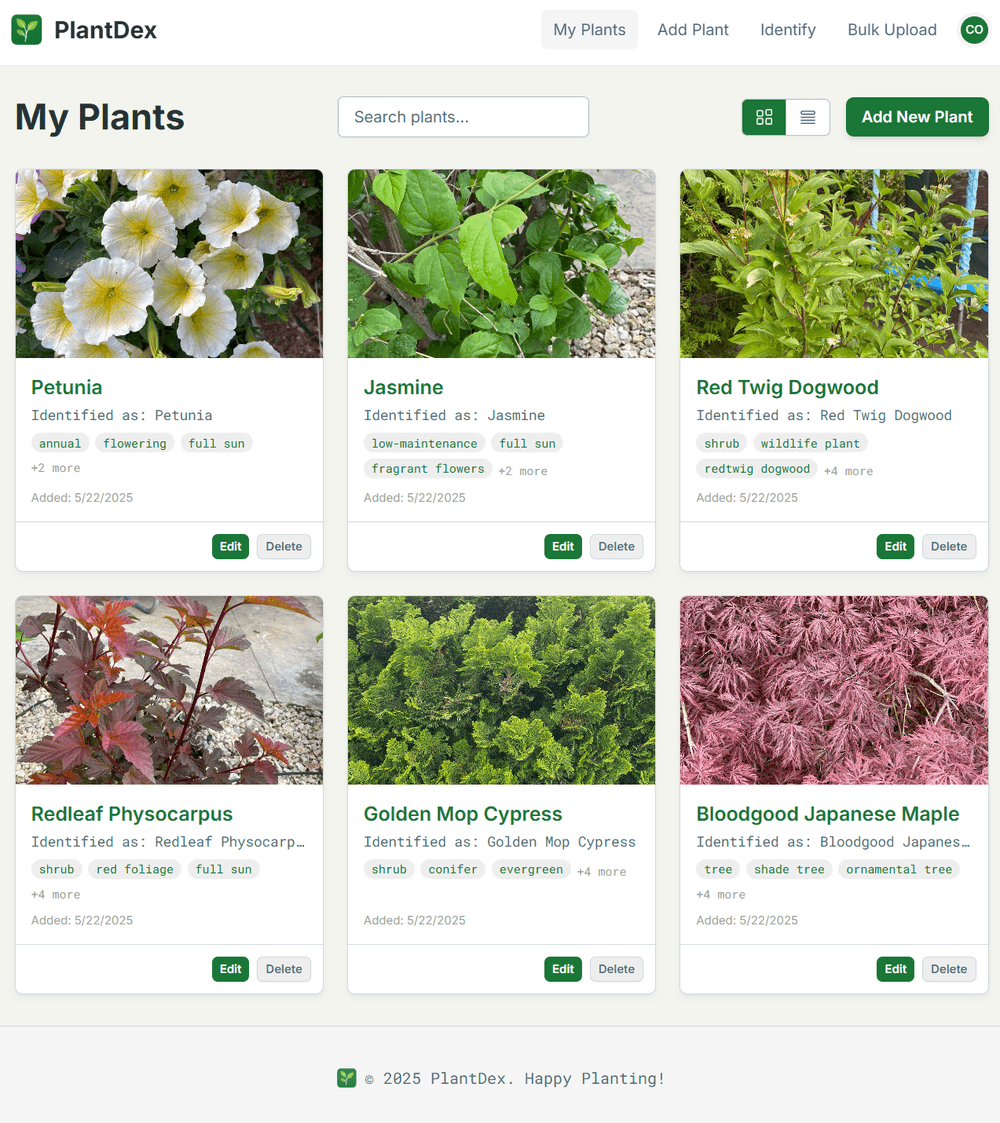
The header image shows the PlantDex MVP as it stands. The app came together quickly, with modern tools and a well-guided AI collaborator. More features are possible, such as better import strategies and advanced filtering. The app is functional and ready for users and further growth.
I now think much software development will involve a partnership between human architects and capable AI implementers. The skill that matters is prompting and guiding the AI well.