Back to writing

May 27, 2025 · essay

AI-Built & User-Ready in Less than 60 minutes - Gemini Codes the Image Reorder & Renumber App

Discover how the Image Reorder & Renumber app (ImageSortAndSave.com) was built entirely by AI (Google Gemini), offering a powerful client-side solution for organizing and downloading your images. An AI-First development case study.

AI-Built & User-Ready in Less than 60 minutes - Gemini Codes the Image Reorder & Renumber App header image

The short version

LLM
Google Gemini 2.5 Pro (the version used throughout our development chat), acting as a dedicated full-stack web developer under my architectural guidance and iterative prompting.
Why
To create a simple, yet powerful, client-side tool for users needing to visually reorder images, rename them sequentially for better organization, and then download them either individually (for smaller sets) or as a convenient ZIP archive. This is particularly useful for preparing image sets for presentations, online galleries, sequential data processing, or any scenario requiring ordered images.
Challenge
Implementing a fluid drag-and-drop interface for reordering images within a grid, ensuring a preview carousel dynamically synchronized with grid changes, integrating robust client-side zipping for potentially many images using JSZip, and managing UI states (like button disabling based on image count or renumbering status) effectively – all while ensuring the AI (Gemini) generated clean, maintainable HTML, CSS, and vanilla JavaScript.
Outcome
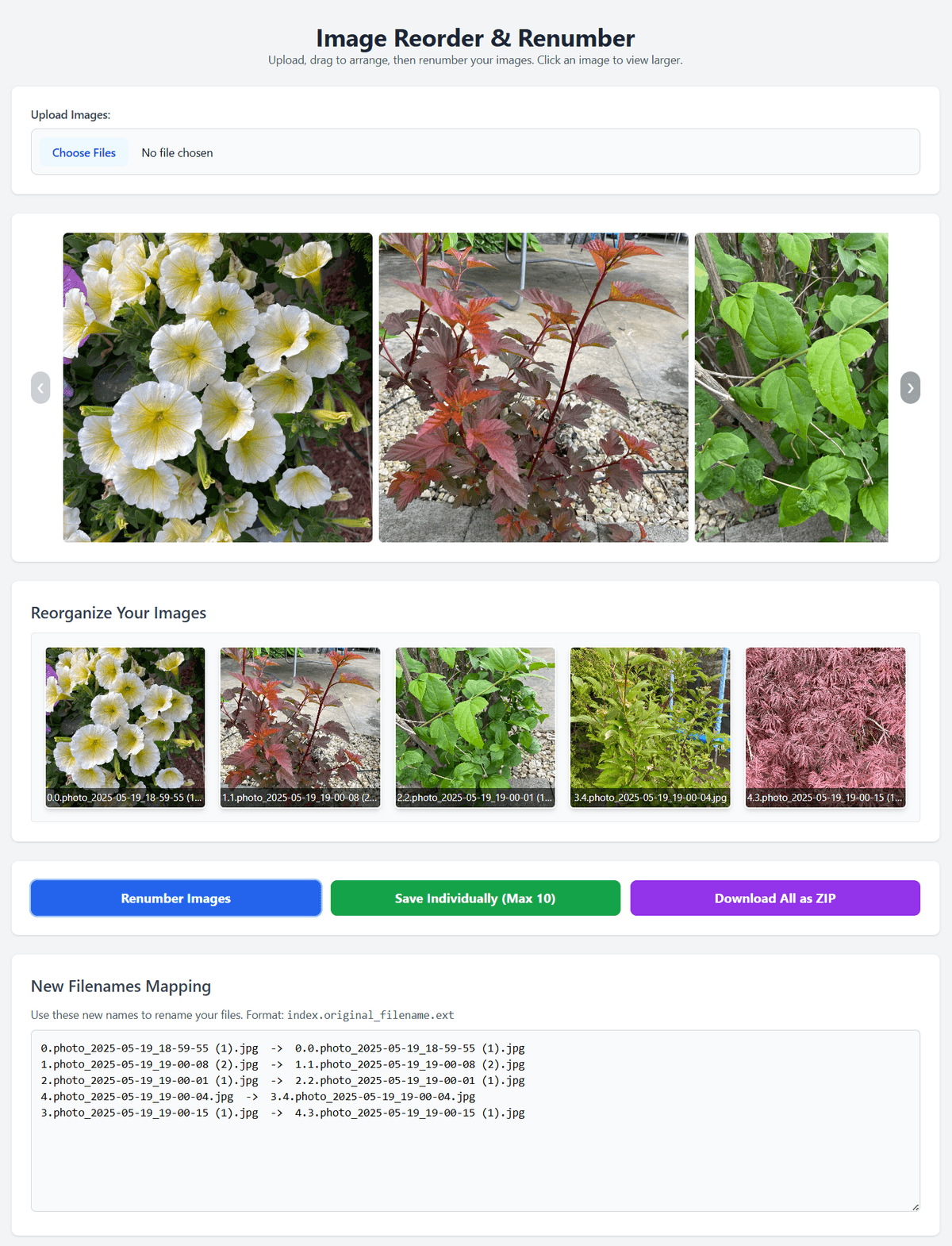
A fully functional single-page web application, imagesortandsave.com built entirely by Gemini. The app features image upload, drag-and-drop reordering, a synchronized preview carousel, an image modal viewer, sequential renumbering logic, individual image downloads (intelligently limited to 10), and a 'Download All as ZIP' capability, providing a complete client-side solution.
AI approach
One hundred percent of the HTML structure, Tailwind CSS styling, and vanilla JavaScript logic for this application was generated by Gemini. My role was to define each feature progressively (carousel, then grid, then renumbering, then downloads, then ZIP, etc.), provide the core architectural decisions (e.g., single-page app, use of specific libraries like JSZip), test each iteration thoroughly, and prompt for refinements, bug fixes, and feature enhancements throughout our extended collaborative session.
Learnings
This project powerfully demonstrates that modern LLMs like Gemini can construct complete, practical web applications from the ground up when guided by clear, iterative human direction. The human role truly shifts to that of an architect, prompter, and quality assurance lead. Key technical learnings include the effectiveness of vanilla JavaScript for such focused utilities, the ease of styling with Tailwind CSS, the power of JSZip for client-side archiving, and the importance of considering browser limitations (like individual download throttling) in the design.

From Tedious Task to AI-Built Tool: Introducing ImageSortAndSave.com

Anyone who has had to prepare a sequence of images – for a presentation, an online gallery, a tutorial, or even just for organized archiving – knows the pain. Manually reordering files, renaming them one by one to ensure they sort correctly (01_image.jpg, 02_another.png...), and then managing the final set can be a surprisingly time-consuming and error-prone chore.

What if there was a simple, fast, client-side tool to solve this? And what if that tool was built almost entirely by an AI? That's the story behind the Image Reorder & Renumber app, a project developed from scratch through an iterative, AI-First collaboration with Google Gemini.

The Problem It Solves: Bringing Order to Your Image Chaos

The core need is straightforward:

  • Visually arrange a collection of uploaded images into a specific sequence.
  • Automatically assign new, sequential filenames (e.g., "0.name.jpg", "1.name.jpg") to reflect this new order.
  • Easily download these renumbered images for use elsewhere.

The Image Reorder & Renumber app tackles this head-on, providing a seamless workflow directly in your browser.

Core Features: A Quick Tour of the AI-Coded Utility

  • Multi-Image Upload: Quickly upload all the images you need to organize.
  • Intuitive Drag & Drop Grid: The heart of the app – simply drag images around in the main grid to set your desired order.
  • Synchronized Preview Carousel: A larger preview carousel at the top dynamically updates to mirror the order in your main grid, giving you a clear view of your sequence as you build it.
  • Click-to-View Modal: Click any image in the grid to open it in a full-size modal viewer with easy previous/next navigation.
  • One-Click Renumbering: Once your images are perfectly ordered, a single click on "Renumber Images" updates all filenames with a "0.", "1.", "2." prefix. A mapping of old to new names is displayed for clarity.
  • Flexible Download Options:
    • Save Individually (Max 10): For smaller sets (up to 10 images, a sensible limit considering browser behavior), download each renumbered image directly.
    • Download All as ZIP: For any number of renumbered images, package them all into a single "renumbered_images.zip" file for convenient download, thanks to client-side zipping with JSZip. A "Zipping..." overlay provides feedback.
  • Responsive Design: Built with Tailwind CSS, the app adapts smoothly to different screen sizes.

The AI-First Build Process: Gemini Takes the Keyboard

This application stands as a practical example of an "AI-First" development paradigm. Throughout our extensive collaborative chat sessions (which led to the app you see at ImageSortAndSave.com), Google Gemini was the primary coder. My role was that of an architect, project manager, and QA specialist (all in 60 minutes or so):

  1. Feature Definition: I outlined each feature requirement iteratively. We started with image upload, then the grid, then drag-and-drop, then the carousel, renumbering, individual downloads, and finally the ZIP functionality and UI refinements.
  2. Technical Direction: I specified the core technologies – vanilla JavaScript for simplicity and direct browser execution, Tailwind CSS for styling, and JSZip for the archiving feature. I also guided the overall structure as a single-page application.
  3. AI Code Generation: Gemini generated the complete HTML structure, the CSS (via Tailwind classes and custom style blocks), and all the JavaScript logic for event handling, DOM manipulation, state management, and algorithm implementation (like the renumbering logic or the JSZip integration).
  4. Iterative Testing & Refinement: After Gemini provided code for a feature, I would test it directly, report any bugs or desired changes, and Gemini would provide revised code. This tight feedback loop was crucial. For instance, getting the drag-and-drop behavior just right, ensuring the carousel updated smoothly, and handling the disabled states of buttons involved several such iterations.

The console logging we implemented throughout became an invaluable tool for me to understand the AI's execution flow and for us to debug issues collaboratively.

Key Technical Challenges Solved by AI (Under Direction)

  • Smooth Drag-and-Drop: Implementing HTML5 drag-and-drop that feels intuitive and correctly reorders elements in both the DOM and underlying data structures.
  • Carousel-Grid Synchronization: Ensuring the preview carousel always accurately reflected the live order of images in the main draggable grid.
  • Client-Side Zipping: Integrating JSZip to collect all image Data URLs and package them into a downloadable ZIP file, including providing user feedback during the (potentially blocking) zipping process.
  • Dynamic UI State Management: Enabling/disabling download buttons based on whether images were uploaded and renumbered, and limiting the "Save Individually" option based on image count.
  • Responsive Button Layout: Adjusting the action button layout from column to row on larger screens using Tailwind's responsive prefixes.

Why This AI-First Approach Shines for Utility Apps

For focused utility applications like the Image Reorder & Renumber tool, the AI-First methodology offers remarkable advantages:

  • Rapid Development: Features can be implemented and iterated upon at a pace that would be challenging for a solo human developer.
  • Accessibility of Creation: It empowers individuals who can clearly define requirements to bring tools to life, even if their own line-by-line coding expertise in a specific stack is still developing. The human focuses on the "what" and "why," and the AI excels at the "how."
  • Focus on User Value: With the AI handling much of the implementation detail, the human orchestrator can dedicate more attention to the user experience and ensuring the tool effectively solves the core problem.

Try It Out & The Road Ahead

I encourage you to visit ImageSortAndSave.com and try out the Image Reorder & Renumber app for yourself! It’s a practical demonstration of what's achievable when human vision guides a capable AI coder.

This project has been a fascinating exploration into the evolving landscape of software development. As AI tools become even more sophisticated, the synergy between human architects and AI implementers will undoubtedly lead to even more innovative and rapidly developed solutions.